Pilot Earbuds Guide: Fit, Comfort & Clarity
By Tomoko Sato • 23rd Feb
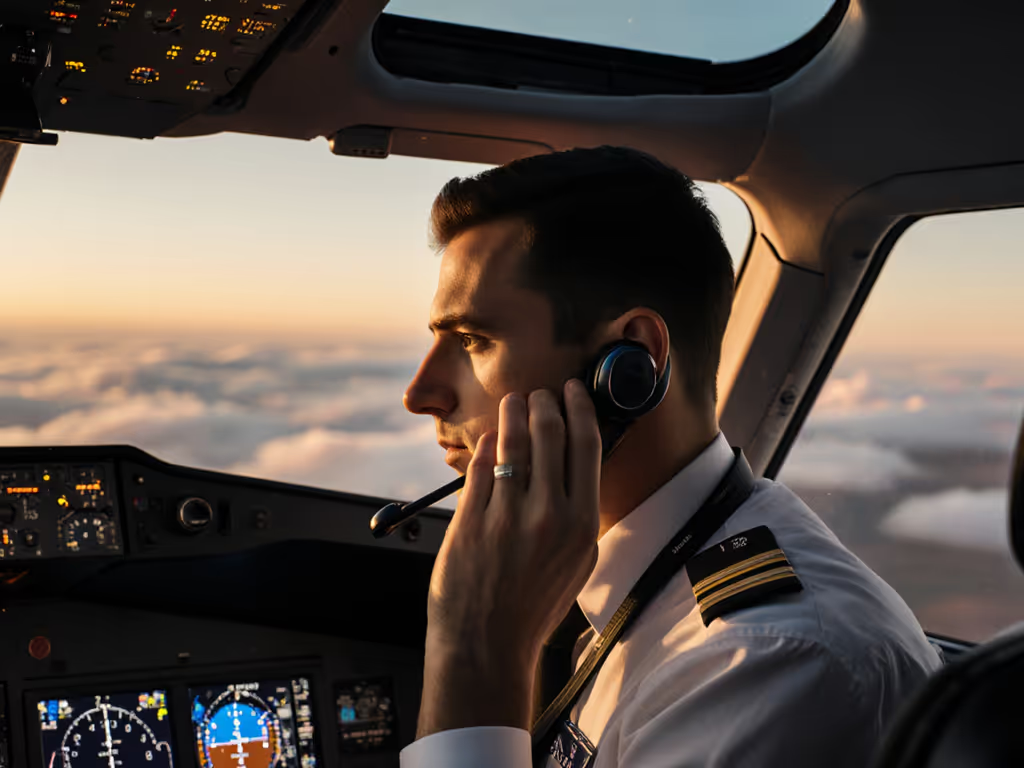
When you're in the cockpit (whether for commercial ops, charter, or personal flight), aviation communication earbuds demand a different standard than consumer audio. They must survive sweat, pressure changes, vibration, and hours of continuous wear. More critically, they must stay put. A bud that shifts mid-conversation kills clarity. A seal that breaks drains your noise reduction. One bleary morning before a client demo, I stood at my desk watching my earbuds refuse to switch from laptop to phone, Bluetooth menus open, coffee cooling, deadline looming. That ten-minute chaos taught me that if switching isn't seamless, the features might as well not exist, and the same principle applies to fit. If your pilot earbuds guide doesn't prioritize stability and repeatability, everything else collapses.
This guide cuts through specs. We'll focus on fit, comfort, and clarity, the three pillars that separate earbuds that disappear into your day from ones that frustrate you into returning them. You'll learn how to assess shell geometry, tip ecosystems, and seal reliability before you commit. Most importantly, you'll understand why these details matter in the demanding environment of aviation.
Why Fit and Stability Come First
In most consumer audio categories, comfort is a nice-to-have. In aviation, it's non-negotiable. You face:
- Long-duration pressure. Turbine aircraft mean extended flights (sometimes 6-10+ hours). A pressure hotspot at 30 minutes becomes unbearable at hour 4.
- Dynamic motion. Preflight walks, cabin movements, head-checking during approach: your earbuds must not loosen or rotate.
- Seal dependency. Unlike over-ear headsets that use circumaural pads and headbands, in-ear designs rely entirely on tip seal. Break the seal; you lose ANR, bass, and communication clarity.
- Environmental variability. Humidity, sweat during pre-flight checks, cabin pressure transitions, and temperature swings all test your fit.
The conventional wisdom ("try different tip sizes") oversimplifies. Your ear canal isn't a cylinder. The concha shape, tragus angle, and nozzle reach all matter. A tip that seals at ground level might loosen at cruise altitude, or shift under the pressure of a headset boom during comm checks.
The Fit Foundation Checklist
Before you evaluate any aviation radio compatible earbuds, confirm these baselines:
- Nozzle angle: Does it match your ear canal's natural entry angle, or do you need to twist the bud to seal? Twisting = eventual drift.
- Shell width and depth: Can you insert it without forcing? Does it contact your ear canal wall before the tip seats? Discomfort and poor seal often mean shallow or angled insertion is required (which destabilizes the bud).
- Tip material and backup supply: Silicone hardens over weeks. Foam compresses and loses grip. Do you have replacements? Can you swap quickly if one fails mid-flight?
- Wings or stability fins: Not all ears need them, but if yours is asymmetric or you move a lot, wings prevent rotation.
- Venting and pressure relief: Does the design allow air behind the tip, or does pressure build during extended wear? Occlusion fatigue is real.
Comfort Across Hours: Managing Hotspots and Fatigue
Even a sealed bud can hurt if the shell geometry creates pressure zones. Common pain points:
- Tragus pressure: The earbud rests against the tragus (that small cartilage point in front of your ear canal). Poor shell design digs in. Look for earbuds with tapered or contoured shells, not flat ends.
- Anti-tragus contact: Some in-ears rest too high, compressing the anti-tragus (the ridge above the tragus). After 90 minutes, it aches.
- Concha impingement: The bud sits on the concha floor. A heavy or wide shell creates focal pressure.
- Occlusion effect: Active noise cancellation (ANR), when aggressive, traps air and creates an "underwater" feeling. Over hours, this triggers dizziness or fatigue. For extended-wear tips and model comparisons, see our comfort fit guide.
The Bose ProFlight Series 2, for example, is engineered explicitly for this challenge. Its design uses combined passive and active noise reduction, which distributes the "silencing load" and reduces occlusion fatigue compared to ANR-only systems. Pilots report comfortable wear at cruise with commercial turbine aircraft, where noise is moderate. The headset's ability to accommodate glasses and caps without breaking the seal is a practical win for pre-flight and post-landing routines.
By contrast, budget in-ear options often sacrifice concha geometry for cost. A $100 earbud might use a wider shell to house electronics cheaply; that wider shell creates broader pressure over your concha, leading to soreness after 3-4 hours.
The Comfort Audit
Test new earbuds in stages:
- First session: 20 minutes. Spot any sharp pressure or immediate discomfort. If yes, try a different tip size or angle.
- Second session: 60 minutes. Walk around, move your head, simulate preflight motion. Does the seal hold? Does pressure build?
- Third session: 2-3 hours. Emulate a short flight segment. Pressure changes matter; sit in a quiet room with ANR on medium or high. Notice dizziness, tingling, or ear fatigue.
- Decision point. If you hit discomfort before 2 hours, return or try a different model. Do not rationalize "I'll get used to it." You won't, and regret is expensive.
Clarity: Seal, ANR, and Microphone Performance
In the cockpit, clarity is survival. Your crew hears you; ATC hears you; you hear critical altitude callouts. Earbuds with poor seal or weak ANR fail this requirement.
Noise Reduction and Listening Level
Aviation headsets must isolate you enough that you don't need to crank volume and risk hearing fatigue. Active Noise Reduction (ANR) attenuates low-frequency engine rumble (typically 30-50 dB of reduction depending on the model and your seal). For a deeper breakdown of how the tech works and its limits in real cabins, read our ANC technology explained.
Bose A30, a circumaural (over-ear) reference, achieves top-tier sound quality and ANR due to its large form factor and dual microphones for feedforward ANR. However, it's not portable like in-ear options. The Faro Stealth 2 ANR, a circumaural alternative, provides up to 52 dB of noise reduction and full Bluetooth for a fraction of Bose's price. If you're flying larger aircraft or need a stationary cockpit setup, circumaural is often superior. If you're jumping between small aircraft, commute flights, or fitness routines, in-ear is lighter and more practical.
The Clarity Aloft Link offers Bluetooth and 3.5mm audio input, making it hybrid-capable for both radio and phone. It's lightweight and comfortable but lacks TSO (Technical Standard Order) certification, important if you're flying under Part 91 rules requiring approved headsets for certain operations. Conversely, the Clarity Aloft Flex is TSO-certified but lacks Bluetooth, so it's wired-only and better suited to dedicated cockpit use.
Microphone Placement and Fit Stability
Microphone quality depends on:
- Positioning. The microphone boom (if present) must stay in place relative to your mouth. Loose earbuds rotate the boom, and your voice becomes unclear or disappears during transmit.
- Windscreen or mesh. In-ear mics are sensitive to breath and wind noise. A good windscreen reduces plosives ("P" and "B" sounds that spike levels) and cabin noise bleed.
- Noise suppression. Some earbuds apply digital noise suppression to isolate your voice. FARO AIR includes an Electret microphone with crisp modulation and stable placement, a strength if you're doing radio work or calls during flight.
Here's the practical truth: a bud that fits poorly will rotate during radio work. Its microphone boom drifts. ATC or crew hear muffled or intermittent audio. You don't know until you're airborne. Test your microphone:
- Insert the earbud in your normal flight position (you sitting, slight head tilt as if reading instruments).
- Record yourself speaking naturally: "Calling traffic, Cessna 1234, 5,000 feet descending." Play it back.
- Move your head side to side and up and down. Re-record. Listen for rotational artifacts (boom moving away, volume dropping).
- If the boom moves or your voice changes, the seal or fit is unstable.
Product Comparison: Aviation-Specific Earbuds
Not all earbuds are made for aviation. Consumer models prioritize bass, wireless range, and battery life. Aviation communication earbuds prioritize clarity, stability, and radio compatibility.
The In-Ear Leaders
Bose ProFlight Series 2 ($995)
- Best for: Commercial turbine operations, comfort, ANR sophistication.
- Seal & Fit: Combined PNR (passive) and ANR creates stable pressure. Compatible with caps and glasses.
- Clarity: Excellent. ANR is tuned for jets and turboprops; not ideal for loud piston aircraft. Bluetooth + wired options.
- Durability: 5-year warranty, 45-hour battery. Industry-leading reliability.
- Trade-off: High price. Not TSO-certified as a standalone headset (requires compatible helmet or mount). Niche market, mainly commercial carriers.
Clarity Aloft Flex (TSO-Certified, ~$600-$800 range)
- Best for: GA pilots wanting TSO approval, wired cockpit integration.
- Seal & Fit: Reputation for high comfort; multiple tip options.
- Clarity: Good isolation, wired for reliability. No Bluetooth.
- Durability: Ruggedized for cockpit use. Known for durability in harsh environments.
- Trade-off: Wired only; less convenient for multitasking or ground comms.
Clarity Aloft Link (Bluetooth, Non-TSO, ~$500-$700)
- Best for: Pilots wanting Bluetooth convenience without requiring TSO certification.
- Seal & Fit: Lightweight; designed for comfort.
- Clarity: 3.5mm + Bluetooth inputs; bridges radio and personal audio.
- Durability: 3-year warranty.
- Trade-off: No TSO certification; check your operating rules before flying with it as primary headset.
AXIS In-Ear Aviation Headset (Budget, ~$200-$350)
- Best for: Cost-conscious pilots, practice flights, secondary headset.
- Seal & Fit: Very lightweight, comfortable for shorter sessions.
- Clarity: Good isolation; wired input. No Bluetooth or TSO.
- Durability: Foam tips need replacement every few months; light build.
- Trade-off: Not approved for critical ops; best as a backup or hobby pilot tool.
FARO AIR (Budget-Friendly, ~$300-$500)
- Best for: Pilots wanting noise reduction on a budget; Electret microphone quality.
- Seal & Fit: Replaceable foam earplugs; dual volume controls make fit adjustments easy in flight.
- Clarity: 50 dB noise reduction; stable mic placement.
- Durability: Replaceable foam tips; 3.5mm input; no Bluetooth.
- Trade-off: No wireless; wired-only reduces convenience for modern multitasking.
Circumaural (Over-Ear) for Reference
For cockpit-only use, circumaural headsets often outperform in-ear options:
- Lightspeed Zulu 4 (14.6 oz, ~$800-$1,200): Lightweight, dual Bluetooth, 52 dB ANR, refined ergonomics. Best for GA pilots wanting modern tech without bulk.
- Faro Stealth 2 ANR (~$400-$600): Plush leather, stainless steel band, 52 dB ANR, full Bluetooth. High-quality materials at mid-tier price.
- David Clark Pro-X2 (Best value circumaural): Durable, established brand, lower cost than Bose.
The trade-off: circumaural headsets are bulkier, heavier (1-2 lbs vs. 0.3 oz for in-ear), and harder to pack. In-ear is portable; circumaural is stationary cockpit comfort.
Fewer Taps, Fewer Traps: Reliability Protocols
Here's what I learned from that morning when my buds wouldn't switch from laptop to phone: complexity kills reliability. Every extra setting, every Bluetooth pairing, every firmware update is a trap.
Pre-Flight Earbud Checklist
Before every flight:
- Seal test. Insert earbuds. Press firmly; hold 3 seconds. Release. Do they stay in place? If they fall out, reseat and try a different tip size or angle.
- Radio connection. Plug into your headset jack (if wired) or confirm Bluetooth pairing (if wireless). Speak test phrase: "Radio check, 1-2-3." Hear yourself in both ears evenly?
- Microphone test. Speak normally; listen for boomy or muffled effect. If poor, reseat and retry.
- Battery check. If Bluetooth, is battery adequate for your flight + 1 hour buffer?
- Tip inventory. Are you carrying a backup tip set? Cotton swab in your flight bag for emergency earwax cleanup?
In-Flight Reliability Audit
Take 2 minutes during preflight to log:
- Seal stability over 10 minutes: Any drift or rotation?
- Comfort status: Any hotspots emerging?
- Audio clarity: Is ANR stable? Any dropouts or noise floor rise?
- Microphone tracking: Test a crew or ATC call. Clear on the other end?
If any issue flags, land and investigate. Sweat, pressure change, or fit shift often cause mid-flight deterioration. A seal that drifts by 1 mm undermines ANR performance by 10+ dB. Catch it early.
Making Your Choice: A Decision Tree
Here's how to narrow it:
Question 1: Do you need TSO certification?
- Yes → Clarity Aloft Flex (wired) or check your aircraft/operation rules.
- No → Move to Q2.
Question 2: Is Bluetooth important?
- Yes → Bose ProFlight Series 2 (premium) or Clarity Aloft Link (mid-range).
- No → Move to Q3.
Question 3: What's your budget?
- $900+: Bose ProFlight Series 2.
- $600-$800: Clarity Aloft Flex.
- $300-$600: Clarity Aloft Link, FARO AIR, or Lightspeed alternatives.
- <$350: AXIS In-Ear or budget circumaural.
Question 4: Session length and environment?
- Long hours (6+), turbine aircraft, comfort priority → Bose ProFlight or circumaural Lightspeed Zulu 4.
- 2-4 hours, mixed GA, portability → Clarity Aloft Link or FARO AIR.
- Backup or practice → AXIS.
Fit Customization: The Ecosystem Approach
One tip size will not fit all. High-quality earbuds offer:
- Multiple silicone tips: S, M, L, sometimes XS and XL. Budget: 30-45 minutes trying each.
- Foam tips: Mold to your ear over 60 seconds; great for odd ear shapes. Trade-off: need replacement every 2-4 weeks with heavy use.
- Hybrid tips: Foam dome, silicone stem. Combines molding + durability.
- Stability wings or fins: Small appendages that brace against your ear's outer ridge, preventing rotation.
For aviation, I recommend a dual-tip strategy:
- Daily tip: Whichever silicone size seals best for your routine (commute, ground ops).
- Backup tip: A different size or foam variant, stored in your flight bag. If daily tips fail or degrade, swap in flight or before departure.
Hearing Safety and Long-Duration Comfort
A crucial oversight in many earbud reviews: hearing fatigue and damage risk. Aviation earbuds isolate well, which is good, but isolation can mask how loud you're listening.
Golden rule: If you're turning volume up to hear through ANR or noise, your seal or earbud placement is wrong. Reseat first. Only then adjust volume.
Good ANR should let you listen comfortably at 65-75 dB without breakthrough noise. If you're creeping toward 85 dB to drown out 90 dB cabin noise, your earbuds aren't isolating; they're just loud. Prolonged exposure to 85+ dB causes hearing fatigue and cumulative damage. Protect your hearing with the practices in our safe listening guide.
The Bose A30 and Lightspeed Zulu 4 excel here because their ANR is mature enough that you rarely need to compensate with volume. Budget options like AXIS may require slightly higher listening levels.
Maintenance and Durability
Earbuds that cost $500-$1,000 must last years, not months. Cockpit environments are harsh:
- Sweat and humidity. Even with "water resistant" ratings, moisture gets in. Clean tips weekly with a damp cloth. Never submerge.
- Earwax and debris. Inspect tip nozzles weekly. A clogged nozzle kills seal and clarity. Cotton swab or soft brush, gently. Follow our wireless earbud cleaning guide for maintenance steps that preserve seal and clarity.
- Tip degradation. Silicone hardens; foam compresses. Budget $50-$100/year for tip replacement if you fly frequently.
- Cable chafing (if wired). Inspect wired headsets monthly. A frayed wire inside the ear canal is a catastrophic failure. Replace immediately.
- Storage. Use the case provided. Do not leave earbuds sitting in sunlight or high heat (above 140°F). Electronics fail.
The Path Forward: Your Next Steps
Fitting earbuds for aviation isn't a one-size-fits-all process. It's an audit. Here's your action plan:
- Identify your constraints: TSO requirement? Bluetooth necessity? Budget ceiling? Flight duration and aircraft type?
- Narrow to 2-3 models using the decision tree above.
- Fit test protocol: If possible, borrow or demo a candidate headset. If ordering online, accept the return window as part of the fit discovery. (Most retailers allow 30-60 day returns.)
- Pocket test: Once you own them, wear in ground ops (preflight walk, head checks, radio calls) before committing to a flight.
- Seal and clarity audit: Confirm the seal holds across altitude and activity. Confirm the microphone stays clear through a full comm session.
- Tip ecosystem. Stock backups in your flight bag before your first long flight.
The goal is disappearance. When you stop thinking about your earbuds, when they're just part of your routine, not a source of friction, you've won. Good design gets out of the way. Your focus stays on flying.
If switching isn't seamless, the features might as well not exist, and the same principle applies to fit. Set-and-forget stability, reliable seal, and frictionless communication are not luxuries in aviation; they're baseline requirements. Test thoroughly before committing to hours aloft.
Checklists, tip inventory, seal audits, and microphone tests might feel obsessive. They're not. They're the difference between a headset that disappears and one that distracts you when precision matters most. Fewer taps, fewer traps. Fly well.
Related Articles